
How UX Design Improves Website Performance?
A Simple Guide for Businesses...

Introduction
Numerous companies add vast resources into their online storefronts yet find themselves with dismally underperforming sites. Low conversion rates, high bounce rates, and negligible user engagement plague too many businesses. Often, it’s not the service or product at fault. More frequently, the problem lies with the site’s user experience (UX).
What makes a website good or bad?
An intuitive, fast, and enjoyable user experience is what we strive for when designing a website. That’s what makes a website be in the best condition to receive its visitors,
and the opposite of that makes it in the worst condition.
The worst condition would follow this pattern: First, the website wouldn’t be at all intuitive for its users. That is to say, they wouldn’t have any clear paths to take in order to get to the places that they need to go.
Second, the people who are using this not-at-all-intuitive website would be having a pretty terrible time doing so — thus the ‘enjoyable’ part of the user experience being totally axed. In this blog, we will look into how UX design makes websites perform at their peak, and lay out all the strategies a business can use to whip its website into shape.
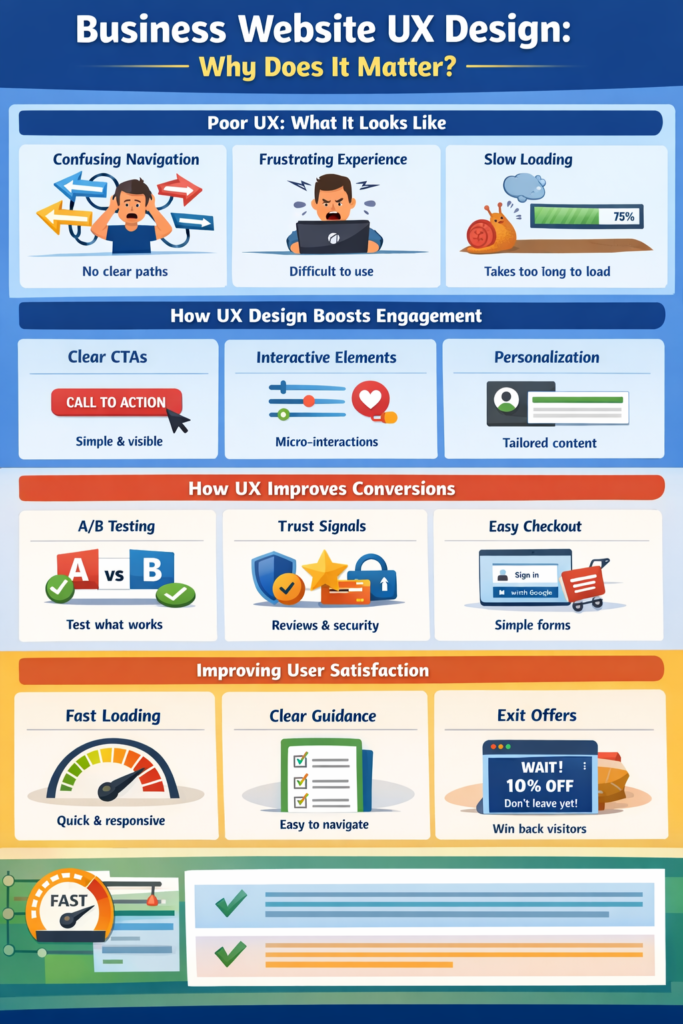
Business Website UX Design: Why Does It Matters ?
UX design matches user expectations with website structure, content, and interactions. UX Design Increases User Engagement Engagement involves user interaction with content and features.
UX promotes exploration and return: Short paragraphs, bullet lists, and clear CTAs improve readability. Micro-interactions: Button states, loading indicators, and subtle animations reassure users. Personalization: Contextual recommendations and saved preferences improve relevance. Improving performance: Faster load times and perceived speed reduce bounces. Engagement-boosting examples Use sticky navigation or table-of-contents to divide long pages. Place related content cards below articles or products.
Practical usability improvements to implement:
Place CTAs in a clear visual hierarchy (size, color, spacing). UX design boosts conversions by: One main CTA per page with supporting secondary actions.Trust signals: Reviews, security badges, and transparent pricing reduce doubt.
How UX Design Raises Conversion Rates:
A/B testing layout, copy, and CTAs to find what works. Try conversion-focused improvements Repeat primary CTA above the fold at logical points. Reduce fields and allow social or Google sign-in to simplify checkout. Recover abandoned users with exit-intent offers or contextual chat.
Conversion-focused improvements to try:
Self-service, clear policies, and easy returns reduce frustration. Clarifying the one main action we want users to take on each page (and boosting the effectiveness of secondary actions). Repeating the main CTA above the fold at logical points. Reducing fields and allowing social or Google sign-in to simplify checkout. Recovering abandoned users with exit-intent offers or contextual chat.
Simple ways to improve satisfaction:
Having context helps the system make better choices. Speed—this is measured in two ways: overall system responsiveness and the specific measurement of how fast the system can load. If these two things work well, users are much less likely to “bounce” (leave the system after doing just one thing). These are also examples of things that can engage users — and longer engagement tends to make people more likely to convert (do the things we want them to do, like buying products).
Starting with a short usability audit, fixing the top three conversion blockers, and measuring the results will help you prioritize changes for maximum impact.
External links:
- Nielsen Norman Group (usability research and best practices): https://www.nngroup.com
- Google’s Web Fundamentals (performance & UX guidance): https://web.dev
- Baymard Institute (checkout usability research): https://baymard.com